Complete IT Solutions Vedanshi Technocare

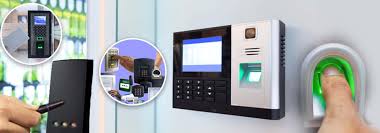
Bio Metric Attendance machine

A bio metric attendance machine uses unique biological traits like fingerprints or facial features to ensure accurate, secure employee attendance tracking, helping organisations eliminate fraud and streamline workforce management. Modern bio metric systems offer real-time analytics, cloud connectivity, and integration with payroll, serving industries from education to manufacturing and retail.

How Biometric Attendance Machines Work

  • Biometric devices identify employees using fingerprint scans, facial recognition, iris scans, hand geometry, or even voice recognition.
  • Each employee’s trait is enrolled into the system as a unique template; future attempts to clock in or out require matching this template.
  • Advanced models use AI for faster, more accurate identification even in challenging environments, and can integrate with mobile apps for remote or field-based work.

Key Benefits

  • Eliminates time theft (buddy punching) and manual errors by ensuring only the enrolled person can mark attendance.
  • Boosts data accuracy and employee accountability since records are tamper-proof and updates are instant.
  • Automates payroll calculations, integrating working hours directly into payroll management software.
  • Improves workplace security by restricting access to approved personnel only.

Choosing the Right Machine

  • Evaluate compatibility with existing HR or payroll systems for smooth integration.
  • Consider scalability (user capacity), speed of identification, and ruggedness for harsh environments.
  • Ensure compliance with security and privacy regulations, with encrypted storage of biometric templates.
  • User-friendly interfaces and reliable support should be prioritized for easy adoption and maintenance.

Industries Using Biometric Attendance

IndustryUse Case
EducationAccurate student tracking
Corporate OfficesPrevents buddy punching
ManufacturingShift management, compliance
HealthcareStaff scheduling, security
RetailReal-time presence across sites

Bio metric attendance machines represent a secure, efficient evolution in workforce management, offering automation, fraud prevention, and effortless reporting for modern organisations

CCTV camera installation

Introduction

CCTV camera installation is a practical way to enhance security for homes, businesses, and public spaces. A well-planned setup deters crime and ensures effective monitoring of important areas. This blog will walk through the entire process, from planning to setup and system configuration.

Planning and Preparation

Before installation, carefully plan your camera layout and gather all necessary tools and equipment:

  • CCTV cameras (wired or wireless)
  • Digital Video Recorder (DVR) or Network Video Recorder (NVR)
  • Power supplies, cables (Ethernet for IP cameras), and connectors
  • Mounting hardware (screws, brackets)
  • Monitor or computer for footage viewing
  • Screwdrivers, power drill, fish tape, wire strippers, cable testers, and measuring tools

Pro Tip: Take photos of intended locations and have a checklist to track items and maintenance steps.

Choosing Camera Locations

Strategic placement is crucial:

  • Cover main entry points, driveways, hallways, and high-value areas
  • Mount cameras at 8–10 feet to deter vandalism and achieve optimal coverage
  • Avoid direct sunlight and ensure stable, accessible power sources
  • For wireless cameras, check network signal strength

Mounting the Cameras

Follow these steps to secure each camera:

  • Mark and drill mounting points using the camera’s template
  • Affix mounts/brackets securely to the wall or ceiling
  • Run cables (through walls or conduits for a clean look)
  • Attach the camera and ensure it is steady; weatherproof outdoor installations

Important: Allow slack in cables for adjustments and future repairs.

Connecting and Configuring the System

Hardware installation is followed by system configuration:

  • Connect cameras to DVR/NVR; for IP cameras, use Power over Ethernet (PoE) switches if needed
  • Ensure all cables are properly terminated and tested
  • Configure recording settings (continuous, motion-detection, or scheduled)
  • Check resolutions and storage management settings
  • Set up motion detection zones and remote viewing access via app or web

Testing and Fine-Tuning

Validate the installation before finalizing:

  • Test live video feeds from all cameras for clear image and proper angle
  • Verify that video is recording and alerts work as expected
  • Train other users on accessing and managing the system
  • Document settings and keep a backup of network and software configurations

Essential Tools List

ToolPurpose/Use
Screwdriver SetMounting, securing devices
Power DrillMaking holes/mounting brackets
Fish Tape/Wire PullerRouting cables
Wire StrippersCable connections
Crimping ToolsAttaching connectors
Cable TesterVerifying network integrity
MultimeterElectrical troubleshooting
Level/Measuring TapePrecise camera placement

Maintenance and Legal Considerations

Maintain your system regularly:

  • Clean lenses and check for obstructions
  • Update firmware and backup recordings
  • For home installations, inform all visitors about active surveillance as required by law

Conclusion

Proper CCTV camera installation ensures robust security, peace of mind, and easy future expansion or troubleshooting. Following a structured approach and using high-quality tools delivers the best long-term results.

Related

Best camera types for home CCTV installation

How to plan camera placement for full coverage

Step-by-step wiring guide for NVR and PoE systems

How to calculate storage needs and choose hard drives

Common installation mistakes and how to avoid them